Working with role and JWT tokens
Authorization options
JWT token
This type of authorization uses a JWT token that the app passes to the SDK. The token is added to the header of every request.
JWT (JSON Web Token) is a string in JSON format containing claims (a set of data) signed for authenticity and integrity verification.
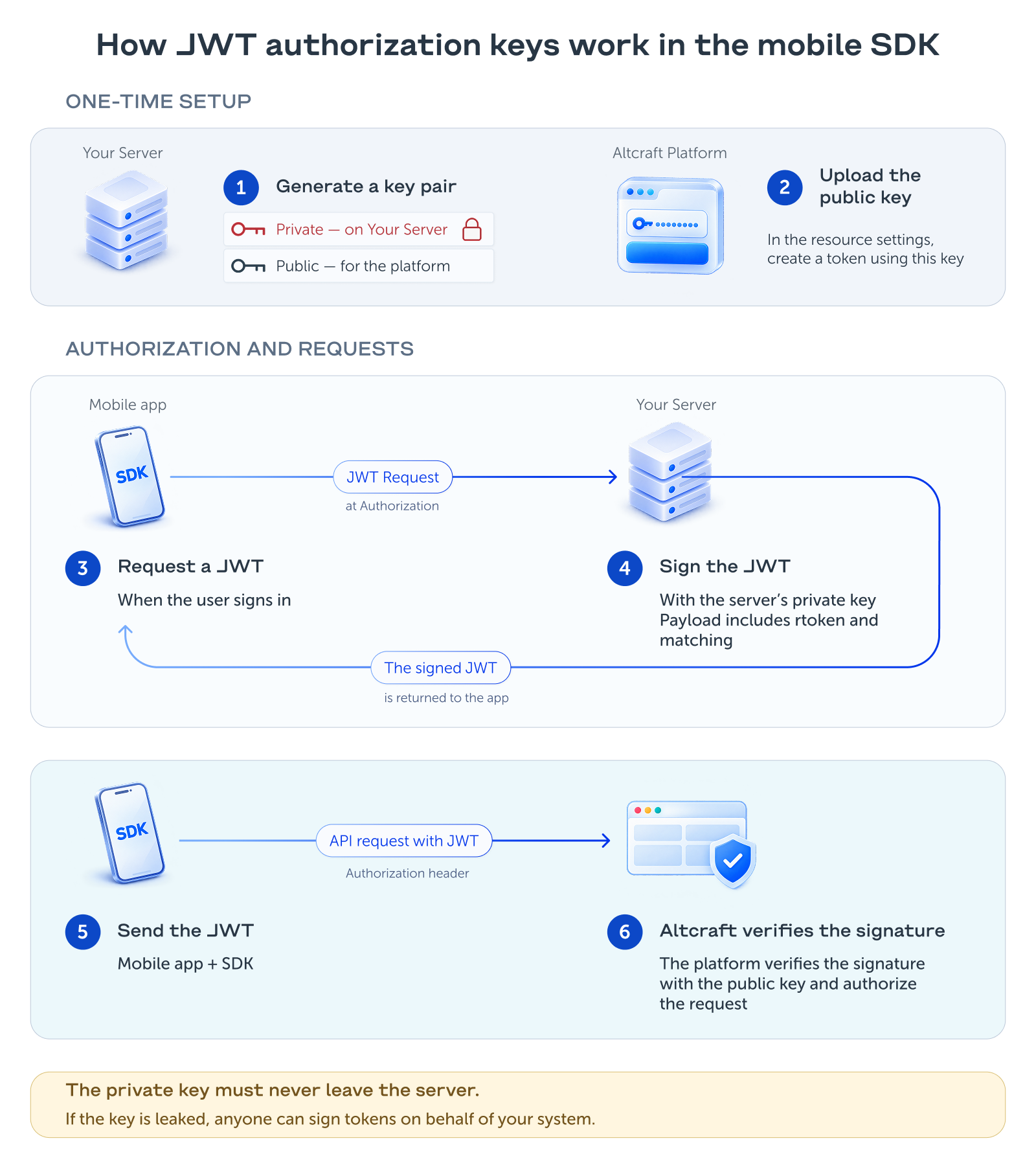
The token is generated and signed with an encryption key on the client's server side (encryption keys are not stored in the app). Upon the SDK's request, the app must provide the JWT token received from the server. For details on where the keys come from and how they relate to the token, see the "How the keys work" section.
Advantages:
- Improved security of API requests.
- Ability to search profiles by any identifiers (email, phone number, custom ID).
- Support for multiple users on a single device.
- Restoring access to a profile after the app is reinstalled.
- Identification of a specific profile across different devices.
rToken
An alternative authorization method is using a role token (rToken) passed in the SDK configuration parameters. With this authorization method, requests include a header with the role token.
Notes:
- Profile search is possible only by the device push token (for example, FCM).
- If the push token changes and is not sent to the server (for example, after the app is deleted and reinstalled), the link to the profile is lost, and a new profile is created as a result.
Limitations:
- Loss of the link to the profile when the push token changes and this change is not recorded on the Altcraft Platform.
- No ability to use the app for different profiles on the same device.
- No ability to register the same user on another device.
Setting up the role token and the JWT provisioning service
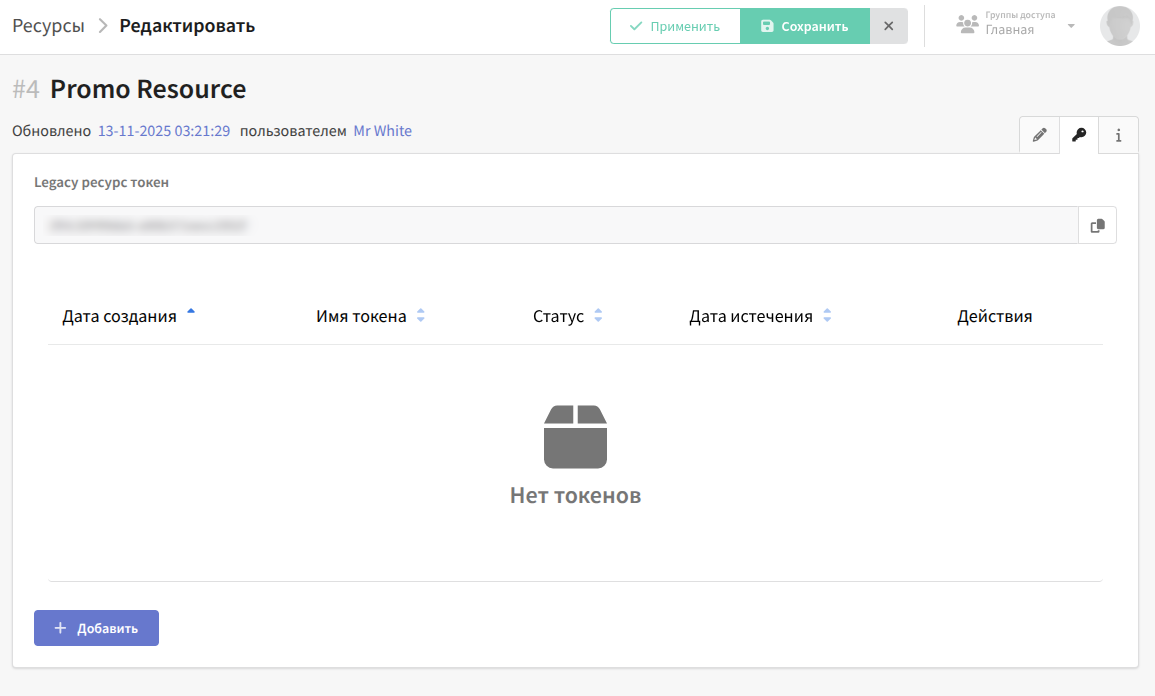
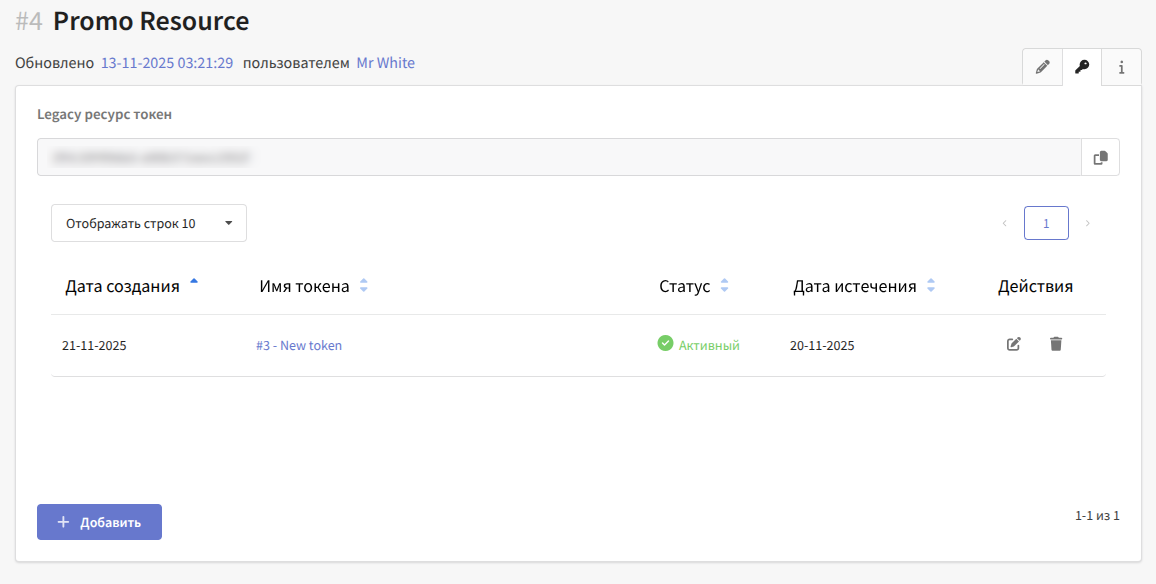
After you create a resource, its settings include a section for managing tokens:
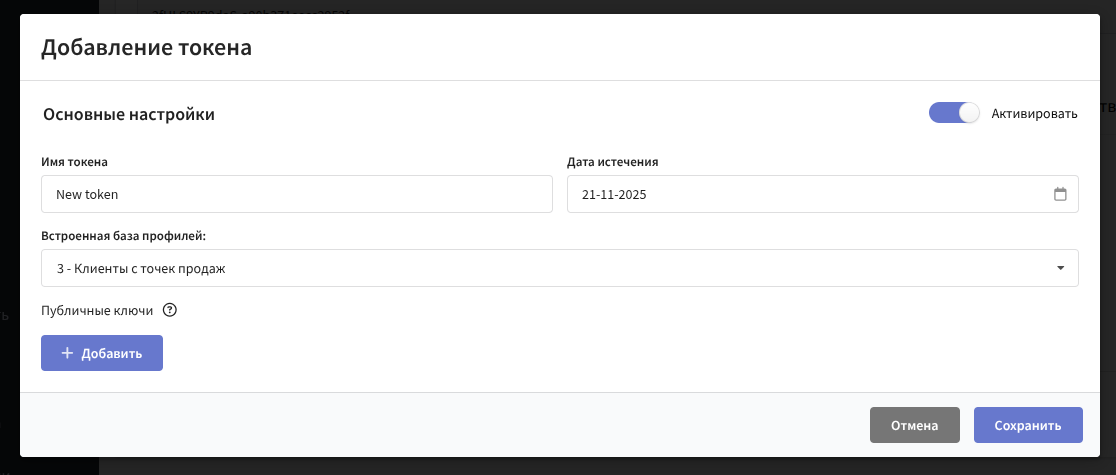
To create a role token, you do not need to add a public key. Simply specify its name, expiration date, and the profile database it is bound to:
The role token serves as an access key from the mSDK side to a specific "resource–database" pair. With authorization using this token, the following actions are available in the platform:
- Registering events
- Updating profile fields
- Importing profiles
To create a JWT token, you need to provide a public key. The platform allows using the ES384 algorithm (ECDSA, as the most reliable), but RS256, ES256, and ES512 can also be used for compatibility with the libraries of different apps.
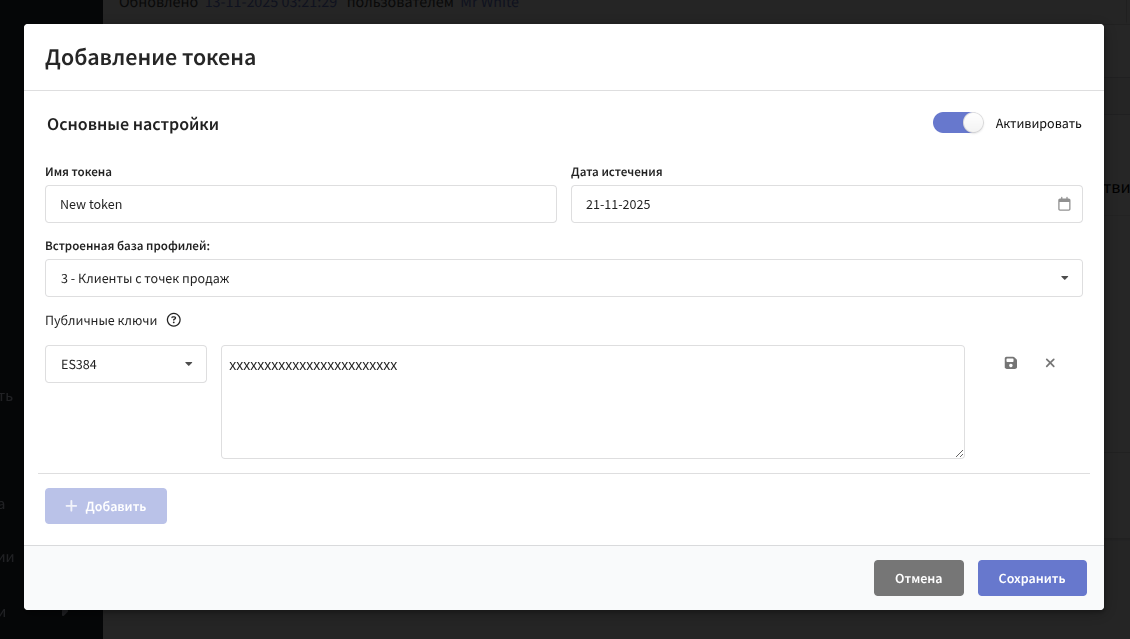
In this example, let's generate a key using the ES384 algorithm:
openssl ecparam -name secp384r1 -genkey -noout -out private.ec.key
openssl ec -in private.ec.key -pubout -out public.pem
Files with the private key and the public key will be generated. The public key is needed for insertion into the platform.
How the keys work
The JWT token signature is based on a key pair created on your side:
- The private key stays on your server. The server uses it to sign JWT tokens before sending them to the app.
- The public key is uploaded to the resource settings in the platform. The platform uses it to verify the signature of every incoming JWT token.
The token is issued to the app by your server, for example when the user signs in to the app. The app passes the token to the SDK, and the SDK adds it to the header of every request. The signature is not stored in the app: even if an attacker obtains the token, they cannot use it to sign new requests.
Do not embed the private key in the app code: it must exist only on your server. If the private key leaks, anyone can sign JWT tokens on behalf of your system and act in the platform on behalf of any profile of the resource.
Diagram of the key and token exchange:
After the token is created, you can copy it and use it later:
Authorizing mSDK requests with the role token
When rToken is used for authorization, it provides access to operations within a specific resource. However, due to its open format and immutable value, a restriction is introduced on the profile matching that can be used.
Specifically, when using a role token, profiles are searched by a set of query parameters. In the current implementation, the backend expects the following query parameters when using rToken:
- provider — mobile notification provider
- subscription_id — the device token provided by the provider
The profile search is performed by the subscription identifier within the databases assigned to the resource.
Notes
- Profile search is possible only by the device push token (for example, FCM).
- When importing a profile via a push subscription, it is marked as "temporary".
- When registering app events, linking to a profile (writing to the profile event history) is not possible.
- If the push token changes and is not sent to the server (for example, after the app is deleted and reinstalled), the link to the profile is lost, and a new profile is created.
- Profile authentication with the
authenticate()method (the/profile/authenticaterequest) is available only with JWT authorization: the platform matches the profile by the matching data from the JWT payload, so this method is not used with a role token.
Usage
When using the Altcraft SDK library, the token is specified as the rToken parameter of the AltcraftConfiguration configuration class.
After that, the library provides it as the authorization header.
If the platform returns 400 Role Token processing error, the role token is rejected: the value cannot be decrypted, the token is not found, its expiration date has passed, or the token is deactivated. Check the expiration date and status of the token in the resource settings.
Authorizing mSDK requests with a JWT token
For secure authorization in the platform, we recommend using a JWT token to authorize requests. The token must be signed with the paired key that was added earlier, during token creation. The platform supports asymmetric algorithms: your server signs the token with the private key, and the public key is uploaded to the platform for signature verification. For details, see the "How the keys work" section.
Key features
- Increased security of API requests. JWT acts as a protective wrapper around the role token, preventing unauthorized actions. The role token is embedded in the JWT token payload, and only with the keys previously provided (in the resource settings) does the platform authorize mSDK actions.
- Ability to search profiles by any identifiers (email, phone number, custom ID), in accordance with matching.
- Support for multiple users on a single device.
- Identification of a specific profile across different devices.
- Restoring access to a profile after the app is reinstalled.
- Profile authentication (the
authenticate()method in the SDK, the/profile/authenticaterequest) is performed only with a JWT token: the platform matches the profile by the matching data from the JWT payload.
Usage
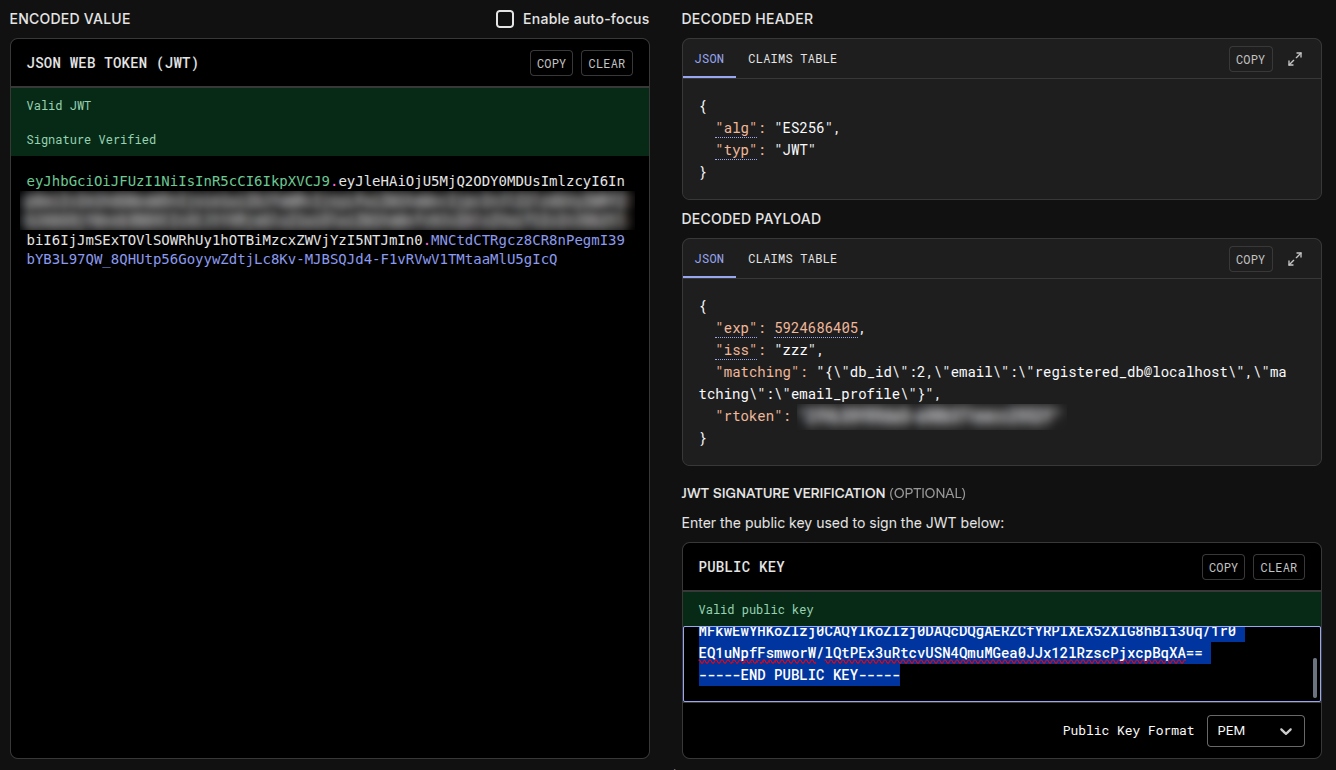
As the JWT payload, the platform expects the following structure:
{
"iss": "<App Name>",
"exp": <UnixTimeUTC>,
"rtoken": "<RoleToken>",
"matching": "JSONString",
}
iss—issuer— the unique identifier of the token creatorexp—expiration time— the token expiration time as a UNIX timestamp in secondsrtoken— the role token obtained when configuring the resource in the platformmatching—JSONString— a string-serialized object, composed in accordance with the documentation. For example:{"db_id":2,"email":"registered_db@localhost","matching":"email_profile"}.
When using the Altcraft SDK library, it is passed as an implementation of the JWTInterface authorization interface. After that, the library likewise provides it as the authorization header.
If both a role token and a JWT provider are set in the SDK configuration, the SDK uses only the role token — the JWT provider is ignored. For JWT authorization, do not specify rToken in the configuration.
Example of what the final JWT may look like: