LDAP access configuration
Overview
You can configure LDAP access to your Altcraft Platform account and Administrative panel. This allows your employees to use company's directory service like Active Directory to log into the platform with a predefined set of access groups and roles.
LDAP can be used for both Administrative panel and for account User interface.
A DistinguishedName for a group of users includes nested groups of directory service hierarchy.
LDAP access to Administrative panel
LDAP access to platform Administrative panel is configured in MarketingPlatform/config/main.json configuration file:
"LDAP": {
  "LDAP_ONLY": false,
  "PRIMARY_HOST": "ldap.primary.example.com",
  "PRIMARY_PORT": 389,
  "SECONDARY_HOST": "ldap.secondary.example.com",
  "SECONDARY_PORT": 389,
  "BINDLOGIN": "cn=admin,dc=example,dc=com",
  "BINDPASS": "your_password",
  "BASE_DN": "dc=example,dc=com",
  "AUTH_GROUP": "CN=AdminGroup,CN=Users,DC=example,DC=com",
  "IS_SSL": false,
  "START_TLS": false,
  "CRT_PATH": "/etc/ssl/certs/ldap_client.crt",
  "CA_CRT_PATH": "/etc/ssl/certs/ca.crt",
  "KEY_PATH": "/etc/ssl/private/ldap_client.key"
},
"LDAP_CHECK_USER_TIME_PERIOD_SEC": 300
| Parameter | Type | Description |
|---|---|---|
| Main parameters | ||
LDAP_ONLY | bool | Prohibits access to the admin panel using login/password created within the platform. All authentication requests are directed to the LDAP server. |
PRIMARY_HOST | string | Network address of the primary LDAP server. |
PRIMARY_PORT | int | Port of the primary LDAP server (usually 389 for LDAP, 636 for LDAPS). |
SECONDARY_HOST | string | Network address of the backup LDAP server for fault tolerance. |
SECONDARY_PORT | int | Port of the backup LDAP server. |
BINDLOGIN | string | Login of the account for connecting to the LDAP server (e.g., cn=admin,dc=example,dc=com). |
BINDPASS | string | Password of the account for connecting to the LDAP server. |
BASE_DN | string | The base DN (Distinguished Name) from which the directory search begins. |
AUTH_GROUP | string | The distinguished name of the LDAP access group that determines employee access to the admin panel. |
| Secure connection parameters | ||
IS_SSL | bool | Enables LDAPS mode (LDAP over SSL). The connection is encrypted from the start on a separate port (usually 636). |
START_TLS | bool | Enables the STARTTLS extension. Encryption is established on top of the regular connection on the standard LDAP port (389) after executing a special command. |
CRT_PATH | string | Path to the client certificate file (if mutual authentication is required). |
CA_CRT_PATH | string | Path to the Certificate Authority (CA) certificate file. |
KEY_PATH | string | Path to the client's private key file. |
| Additional parameters | ||
LDAP_CHECK_USER_TIME_PERIOD_SEC | int | Time interval (in seconds) for checking the compliance of user rights with the granted access. Set outside the LDAP object. Default: 300. |
- The account for connecting to the server (
BINDLOGIN/BINDPASS) must have sufficient rights to read the attributes of the group specified inAUTH_GROUP. - The
IS_SSLandSTART_TLSparameters are mutually exclusive — only one encryption mode can be enabled at a time. More information about the STARTTLS mechanism can be found in this article.
After making changes to the main.json configuration file, restart Altcraft Platform (./akd restart).
LDAP User interface access
LDAP access to account User interface is set up for every account separately in Altcraft Administrative panel.
LDAP binding creation
Enter Altcraft Platform Administrative panel and open Create —> LDAP binding or Setup —> LDAP binding and press Create.
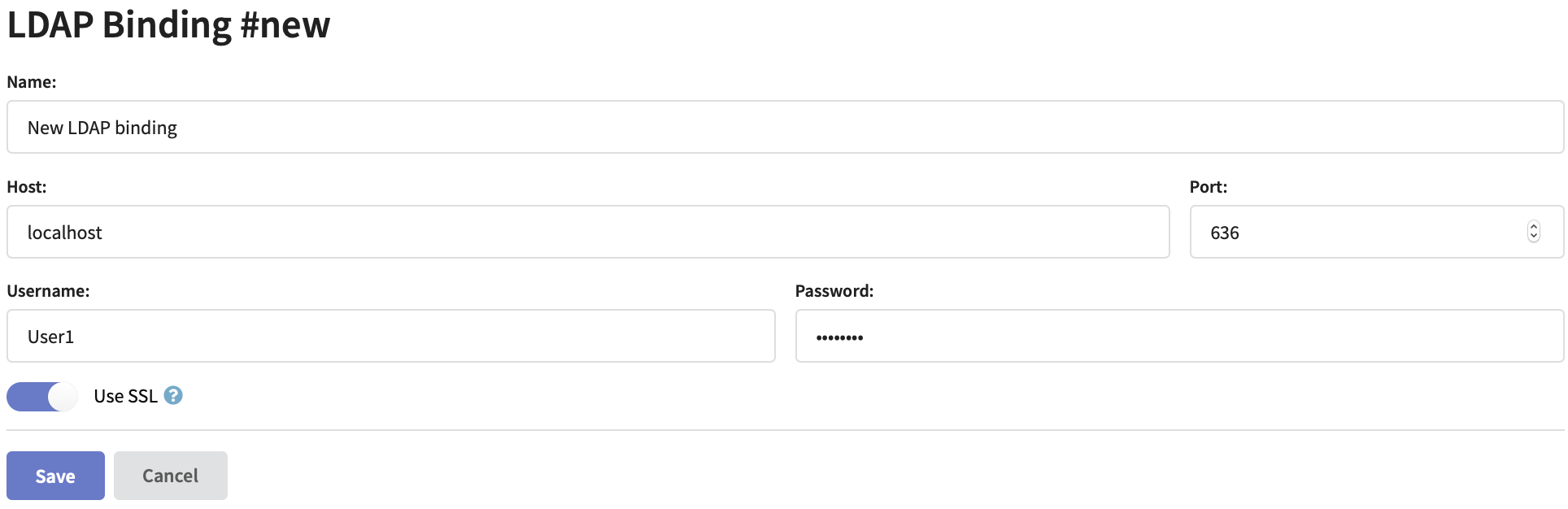
Specify LDAP connector name, directory server network address and port. Enter Username and Password for directory server database access. If you are planning to use a secure connection activate Use SSL option and set up directory service SSL certificates.
Directory service connection account must have sufficient access rights to the groups that will be used for platform authorisation.
Setting up account LDAP access
Open an existing account settings or create a new account. Activate Use LDAP option to get access to the settings:
LDAP only option restricts Altcraft login and password authorisations. All requests will be processed via LDAP to directory service.
Time interval between checking user DistinguishedName and access rights matching is configured in main.json configuration file in LDAP_CHECK_USER_TIME_PERIOD_SEC property with an integer value. By default — 300 seconds.
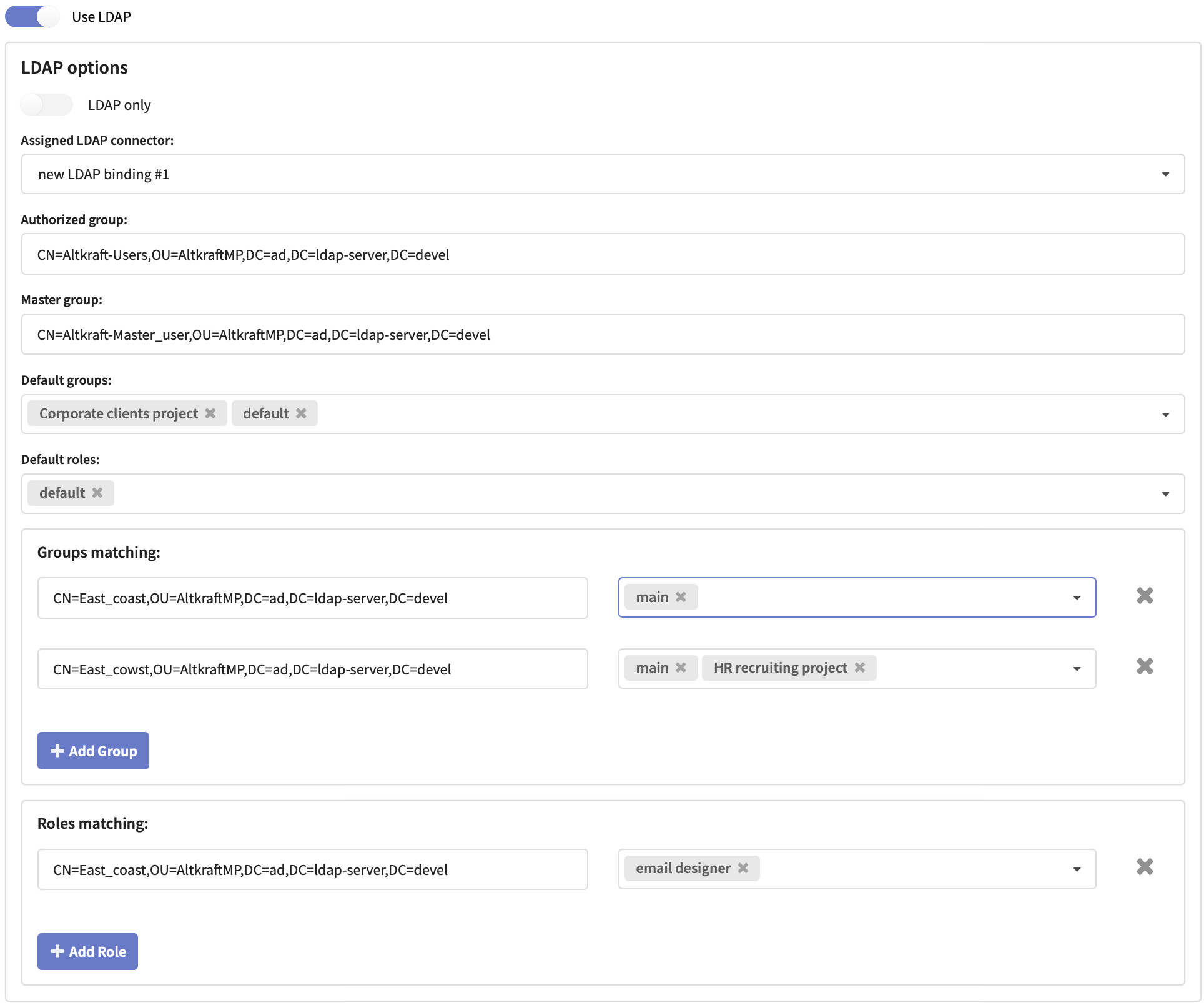
In a dropdown select an Assigned LDAP connector: LDAP binding, you are going to use for this account access.
Basic access settings
For configuring basic account access you will need directory service DistinguishedNames for the following groups:
- Auth Group — allows platform access with a default set of user groups and roles.
- Master Group — allows master access to account settings, main group containing all account objects and to objects outside groups.
Both LDAP groups are required for a user to have master access.
Specify these groups DistinguishedNames in the corresponding fields. As DN examples the following are used: CN — common name, OU — organisation unit and DC — domain component.
Select or create Default Groupsand Default Roles to be accessible by default for all users with Authorized group DistinguishedName.
WARNING! Users with no assigned groups or roles cannot log into account.
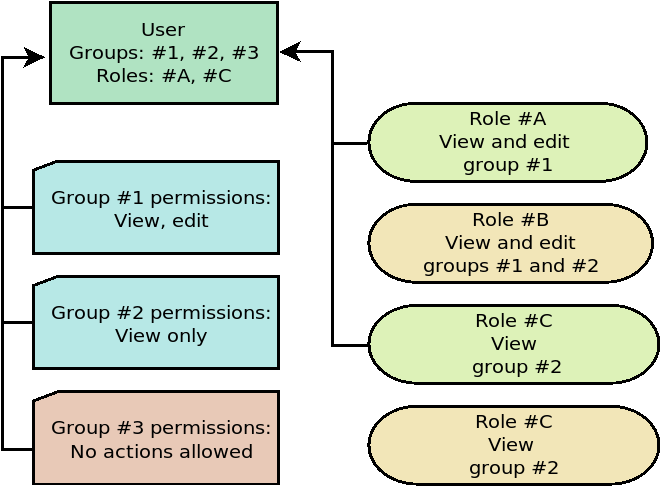
In case a user role allows to interact with a certain group make sure the corresponding group is assigned to the user as well. Otherwise no access to the group will be permitted.
Access differentiation
You can create directory service DistinguishedNames matching custom Altcraft Platform groups and roles.
Enter the DistinguishedNames into these fields:
- Groups matching — to set access groups matching.
- Roles matching — to set access roles matching.
Platform Roles Mode
By default, every time an LDAP user logs in, the platform overwrites their roles and groups based on LDAP group mapping and Default Roles/Default Groups settings. This means roles assigned manually through the platform UI are lost on the user's next login.
If all employees in your organization belong to a single LDAP group but need different roles in Altcraft, enable the Platform roles mode:
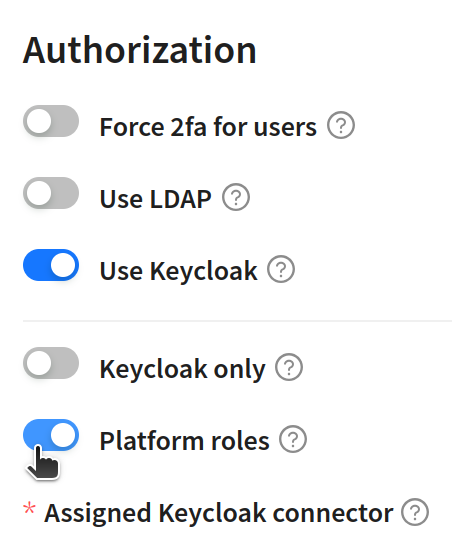
When Platform roles is enabled:
- LDAP is used only for authentication — password check and Auth Group membership verification.
- User roles and groups are not overwritten on login or session refresh.
- Roles and groups are assigned manually through the platform UI (Users) just like for regular users.
- The following fields continue to sync from LDAP: email, first name, last name, active status (IsActive — based on Auth Group membership) and master status (IsMaster — based on Master Group membership).
Use this mode when:
- All users belong to one Active Directory group, but different roles are needed in Altcraft.
- You want to manage roles through the platform UI instead of LDAP group mapping.
Do not enable this mode if you need automatic LDAP group-to-role mapping (default behavior).
A similar Platform roles mode is available for Keycloak integration.
Authorizing with LDAP
To enter Administrative panel use LDAP username and password.
To enter account interface use LDAP username with account alias: ldapuser@domain.com@account1, and LDAP password.
If LDAP only option is disabled, both Altcraft Platform and LDAP login credentials can be used.