Processing HTTP/HTTPS traffic
For a complete list of all configurable parameters, see the section - Configuration file. To apply changes to the platform configuration, restart AKD (./akd restart).
To get free Let's Encrypt certificates, you can use the certbot utility.
Default traffic processing scheme on the Altcraft side
By default, HTTPS is required for pixels to work and custom cookies to be processed. Setting the COOKIESAVER_SSL_ON parameter to false will not affect the presence of the https:// protocol in links generated by mailings.
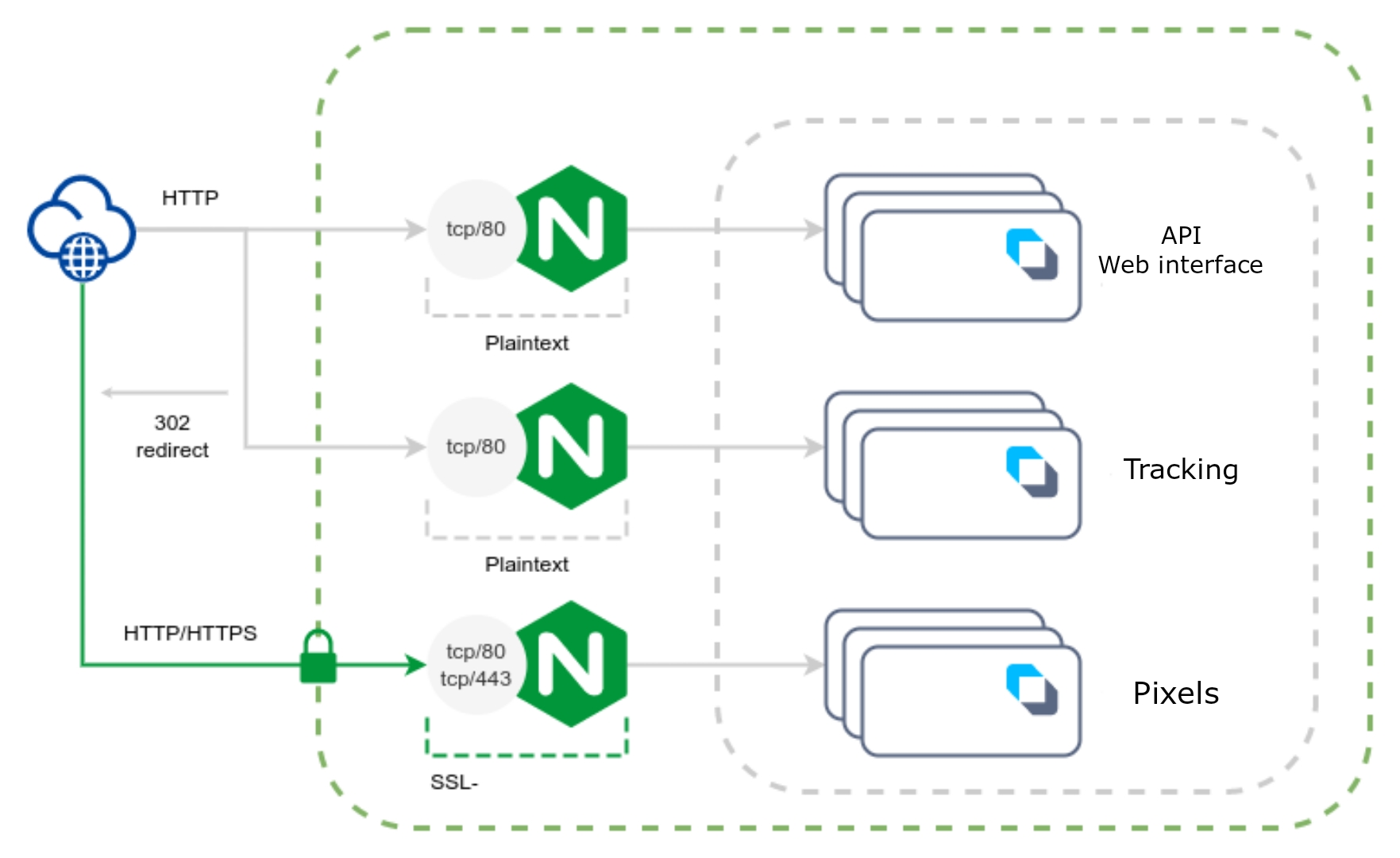
Required parameters
| Parameter | Type | Value | Description |
|---|---|---|---|
| SSL_ON | bool | false | Disabling SSL termination for the web interface |
| TRACKING_SSL_ON | bool | false | Disabling SSL termination for tracking |
| COOKIESAVER_SSL_ON | bool | true | Enable SSL termination for pixels |
| COOKIESAVER_SSL_CRT_PATH | string | /etc/letsencrypt/live/pxl.example.com/fullchain.pem | Path to certificate for pixels |
| COOKIESAVER_SSL_KEY_PATH | string | /etc/letsencrypt/live/pxl.example.com/privkey.pem | Path to the private key to the certificate for pixels |
Scheme for processing traffic with full SSL termination on the Altcraft side
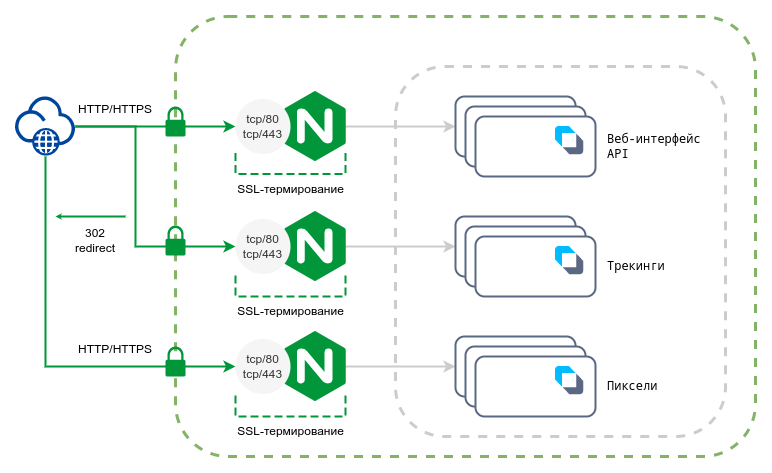
Required parameters
| Parameter | Type | Value | Description |
|---|---|---|---|
| SSL_ON | bool | true | Enabling SSL termination for the web interface |
| SSL_CRT_PATH | string | /etc/letsencrypt/live/altcraft.example.com/fullchain.pem | Path to the certificate for the web interface |
| SSL_CRT_KEY | string | /etc/letsencrypt/live/altcraft.example.com/privkey.pem | Path to the private key to the certificate for the web interface |
| TRACKING_SSL_ON | bool | true | Enabling SSL termination for tracking |
| TRACKING_SSL_CRT_PATH | string | /etc/letsencrypt/live/click.example.com/fullchain.pem | Path to a trekking certificate |
| TRACKING_SSL_CRT_KEY | string | /etc/letsencrypt/live/click.example.com/privkey.pem | Path to the private key to the tracking certificate |
| COOKIESAVER_SSL_ON | bool | true | Enable SSL termination for pixels |
| COOKIESAVER_SSL_CRT_PATH | string | /etc/letsencrypt/live/pxl.example.com/fullchain.pem | Path to certificate for pixels |
| COOKIESAVER_SSL_KEY_PATH | string | /etc/letsencrypt/live/pxl.example.com/privkey.pem | Path to the private key to the certificate for pixels |
Traffic processing scheme with full SSL termination on the external side
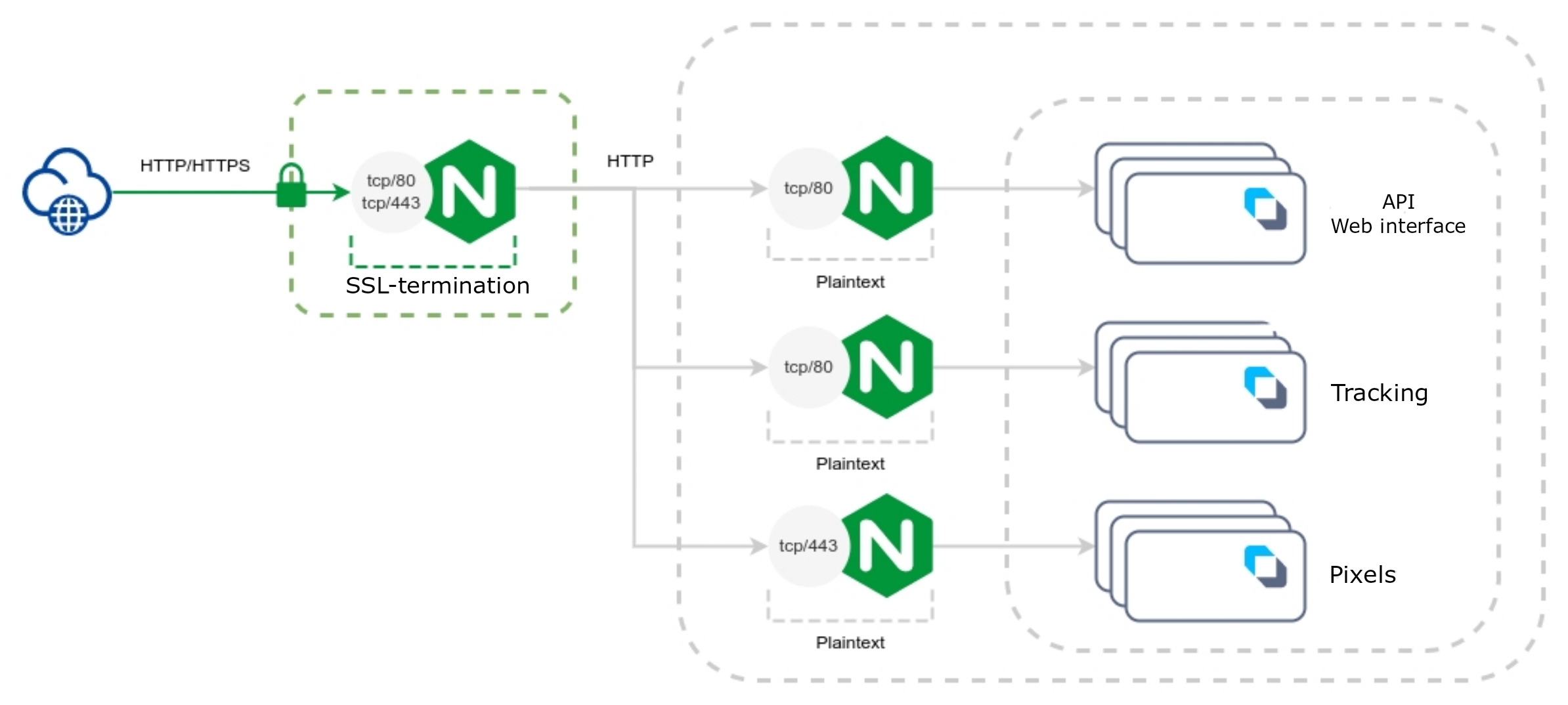
Required parameters
| Parameter | Type | Value | Description |
|---|---|---|---|
| SSL_ON | bool | false | Disabling SSL termination for the web interface |
| TRACKING_SSL_ON | bool | false | Disabling SSL termination for tracking |
| TRACKING_SSL_EXTERNAL_ON | bool | true | Setting the sign of using SSL termination at the top for tracking |
| COOKIESAVER_SSL_ON | bool | false | Disable SSL termination for pixels |
| NGINX_TRUSTED_PROXIES | array | [ "External proxy IP address" ] | List of trusted proxy IP addresses |
| NGINX_REALIP_HEADER | string | "X-Forwarded-For" | Header from which a real IP address of a client will be obtained |
External NGINX Configuration Example
server {
    listen 80;
    listen 443 ssl;
    server_name altcraft.example.com;

    if ($scheme != "https") { return 307 https://$host$request_uri; }
    ssl_certificate /etc/letsencrypt/live/altcraft.example.com/fullchain.pem;
    ssl_certificate_key /etc/letsencrypt/live/altcraft.example.com/privkey.pem;

    ssl_session_cache shared:le_nginx_SSL:10m;
    ssl_session_timeout 1440m;
    ssl_session_tickets off;

    ssl_protocols TLSv1.2 TLSv1.3;

    client_max_body_size 0;
    large_client_header_buffers 4 400k;
    proxy_buffer_size 64k;
    proxy_buffers 64 4k;
    proxy_busy_buffers_size 64k;

    location / {
        proxy_pass http://172.16.0.10:80;
        proxy_set_header X-Forwarded-For $proxy_add_x_forwarded_for;
        proxy_set_header X-Forwarded-Proto $scheme;
        proxy_set_header X-Real-IP $remote_addr;
        proxy_set_header Connection "";
        proxy_set_header Host $host;
        proxy_http_version 1.1;
        proxy_read_timeout 900;
    }

    location /ajax/account_stream {
        proxy_pass http://172.16.0.10:80;
        proxy_set_header X-Forwarded-For $proxy_add_x_forwarded_for;
        proxy_set_header X-Forwarded-Proto $scheme;
        proxy_set_header X-Real-IP $remote_addr;
        proxy_set_header Connection "";
        proxy_set_header Host $host;
        proxy_http_version 1.1;
        proxy_read_timeout 20000;
    }
}


server {
    listen 80;
    listen 443 ssl;
    server_name click.example.com;

    if ($scheme != "https") { return 307 https://$host$request_uri; }
    ssl_certificate /etc/letsencrypt/live/click.example.com/fullchain.pem;
    ssl_certificate_key /etc/letsencrypt/live/click.example.com/privkey.pem;

    ssl_session_cache shared:le_nginx_SSL:10m;
    ssl_session_timeout 1440m;
    ssl_session_tickets off;

    ssl_protocols TLSv1.2 TLSv1.3;

    location / {
        proxy_pass http://172.16.0.11:80;
        proxy_set_header X-Forwarded-For $proxy_add_x_forwarded_for;
        proxy_set_header X-Forwarded-Proto $scheme;
        proxy_set_header X-Real-IP $remote_addr;
        proxy_set_header Connection "";
        proxy_set_header Host $host;
        proxy_http_version 1.1;
        proxy_read_timeout 900;
    }
}


server {
    listen 80;
    listen 443 ssl;
    server_name pxl.example.com;

    if ($scheme != "https") { return 307 https://$host$request_uri; }
    ssl_certificate /etc/letsencrypt/live/pxl.example.com/fullchain.pem;
    ssl_certificate_key /etc/letsencrypt/live/pxl.example.com/privkey.pem;

    ssl_session_cache shared:le_nginx_SSL:10m;
    ssl_session_timeout 1440m;
    ssl_session_tickets off;

    ssl_protocols TLSv1.2 TLSv1.3;

    location / {
        proxy_pass http://172.16.0.12:443;
        proxy_set_header X-Forwarded-For $proxy_add_x_forwarded_for;
        proxy_set_header X-Forwarded-Proto $scheme;
        proxy_set_header X-Real-IP $remote_addr;
        proxy_set_header Connection "";
        proxy_set_header Host $host;
        proxy_http_version 1.1;
        proxy_read_timeout 900;
    }
}
Trust to X-Forwarded-For
The platform determines the real client IP address from the X-Forwarded-For header. It is safe to trust this header only if the request came from the address of a proxy or load balancer listed in the trust parameters:
| Parameter | Type | Default value | Description |
|---|---|---|---|
| TRUSTED\_PROXIES | array | \[ "0.0.0.0/0", "::/0" \] | Addresses from which the platform services accept the real client IP address |
| NGINX\_TRUSTED\_PROXIES | array | \[ "127.0.0.1" \] | Addresses trusted by the platform's internal nginx |
| NGINX\_REALIP\_HEADER | string | "X-Forwarded-For" | Header from which a real IP address of a client will be obtained |
The TRUSTED_PROXIES parameter applies to all platform services that process HTTP requests: the web interface, API, tracking and pixels. If the value is not set, all addresses are considered trusted: any client can pass an arbitrary X-Forwarded-For header, and the spoofed address will end up in geolocation, subscriber segmentation, logs and statistics.
Specify the address of the external proxy or load balancer in the platform network in TRUSTED_PROXIES. Example for a scheme where requests are received by the internal nginx on the same server:
"TRUSTED_PROXIES": [ "127.0.0.1" ],
"NGINX_TRUSTED_PROXIES": [ "127.0.0.1" ]
Changes are applied after restarting AKD (./akd restart). For a full description of the parameters, see the Configuration file section; for requirements to hosting behind a load balancer, see Typical placement in infrastructures.
In-App channel: forced HTTPS
In the In-App channel, platform links always work over the https protocol, regardless of the TRACKING_SSL_ON and TRACKING_SSL_EXTERNAL_ON parameters:
- the placement tracking link — the mobile application uses it to request the placement list and receive In-App content;
- links to platform resources in In-App content — for example, images from the block editor gallery;
- In-App pixels that register displays and content reads.
Forced HTTPS for In-App cannot be disabled: there is no separate configuration parameter for this.
For In-App to work, the tracking domain must serve content over https:
- with SSL termination on the Altcraft side — a valid TLS certificate with a correct chain and SNI support is installed (the TRACKING_SSL_ON, TRACKING_SSL_CRT_PATH, TRACKING_SSL_KEY_PATH parameters);
- with external SSL termination — proxying to port 443 is configured according to the external termination scheme (the TRACKING_SSL_EXTERNAL_ON parameter).
If the tracking domain does not serve content over https after updating to version v2026.3.79, the In-App channel will stop working: the mobile application will not receive placements and content, and displays and clicks will not be registered. Install a certificate on the tracking domain or configure external SSL termination before updating.
After the update, check the channel operation: the mobile application receives placements, In-App content opens via an https link on the tracking domain, and displays and clicks are registered in the placement journal.
Push and AMP channels: forced HTTPS
Forced HTTPS is used not only in the In-App channel but also in the Push and AMP channels. For them to work, the tracking domain must serve content over https — the SSL requirements are the same as for In-App: a valid TLS certificate with a correct chain and SNI support, or external SSL termination.
In the Push channel, tracking links of push notifications always work over https, regardless of the TRACKING_SSL_ON and TRACKING_SSL_EXTERNAL_ON parameters: most push services accept only https links. Forced HTTPS for pushes cannot be disabled. If push tracking links should lead to a separate domain, set it with the GENERAL_SSL_PUSH_TRKDOMEN parameter.
In the AMP version of an email, all links with the http protocol are replaced with https on send — including tracking links, pixels, images in the amp-img tag, and third-party links from the content. This replacement cannot be disabled. It does not affect other parts of the email message: the HTML and text versions follow the general traffic processing scheme. If AMP version tracking links should lead to a separate domain, set it with the GENERAL_SSL_AMP_TRKDOMAIN parameter — in this case, the AMP version tracking links are built on the specified domain over https.
If the tracking domain does not serve content over https, clicks on push notification tracking links will not open, and AMP content will not display in the email client. Install a certificate on the tracking domain or configure external SSL termination.
The directives in the first server block replicate the settings of the platform's internal nginx:
client_max_body_size 0removes the nginx limit on the request body size (the default is 1 MB). Without this directive, profile imports and file uploads fail with error 413 before reaching the platform: the platform's internal nginx does not set a limit, the application controls the size itself. If your security policy requires an explicit limit, set that value instead of zero.large_client_header_buffers,proxy_buffer_size,proxy_buffers,proxy_busy_buffers_sizeset enlarged buffers for headers and responses. Without them, the proxy may respond with the "upstream sent too big header" error on responses with large headers and cookies.- A separate location for
/ajax/account_streamserves the progress stream of bulk operations. While an operation is running, no new events may arrive for a long time, so the read timeout is raised to 20000 seconds; with the default value (900 seconds, as in the other locations) the connection would be closed after 15 minutes of inactivity.