Altcraft Docs LogoAltcraft Docs Logo
User guide iconUser guide
Developer guide iconDeveloper guide
Admin guide iconAdmin guide
English
  • Русский
  • English
Login
    User documentationGetting StartedFAQAltcraft glossaryPlatform limits
      Profiles and databasesarrow
    • Subscription resourcesManaging databasesSubscriber profileProfiles import and data updateCommon Errors When Importing ProfilesScheduled customer data importManaging Data TablesAutomatic data collectionBulk customers profiles updateDouble opt-in subscriptionSuppression listsProfile relationsProfile history exportProfile exportCreating a static segment based on import resultsHow to open a CSV fileMatchingTypes of fields in the databaseGlobal control groupsSubscription Manager
      Communication channelsarrow
      • Email channelarrow
      • Email: ISP interactions best practices
          First mailingarrow
        • Quick StartEmail
        Email: sending domain configurationEmail: setting up and using postmastersHow email tracking works
        Push Channelarrow
        • Mobile Pusharrow
        • First Mobile Push Mailing
            Mobile Push Providersarrow
          • Firebase Cloud MessagingApple Push Notification ServiceHuawei Mobile ServicesRuStoreYandex.AppMetrica
          Integrate your app with Altcraft
            Deprecated: Manual Push Setuparrow
          • Deprecated: Setup and ConnectionProcessing and adding a subscriptionEvent registrationProviders: push message structure
          Web Pusharrow
        • First Web Push MailingResource and Website Setup
            Web Push Providersarrow
          • Firebase Cloud messagingApple SafariMozilla Services
          Transferring Data to the PlatformWeb Push SDK MethodsPWA and Push Notifications
            Migration and Subscription Transferarrow
          • Migrating push subscriptions from third-party servicesHow to transfer push subscriptions configured for Safari?Migration from OneSignal
        Push token deactivation
        SMS channelarrow
      • SMS
        In-Apparrow
      • First In-App PlacementSDK Setup and IntegrationIn-App Cases
      WhatsAppViber*™
        Telegramarrow
      • Telegram BotTelegram Group
        Maxarrow
      • MAX BotMAX Group
      NotifyCommunication Channels WorkflowРуководство: SMS-рассылка через VK NotifyРуководство: SMS-рассылка через УТШРуководство: push-рассылка через сервис от "Согласие"
      Segmentationarrow
    • Static SegmentsDynamic SegmentsUpdatable Segments
        Segmentation Conditionsarrow
      • Segmentation by Profile dataSegmentation by Interactions with EntitiesSegmentation by Activity of the channel
          Segmentation by external dataarrow
        • Segmentation by external dataSegmentation by external SQL tablesRecommendations for segmentation by external data
        Segmentation by Profile structure
      Quick SegmentBest Send Time (BST)Logical operators "AND" and "OR"Recommendations for working with segments
      Message templatesarrow
      • Working with message templatesarrow
      • Working in the editorEmail templateSMS templatePush templateTemplate for In-AppMAX templateTelegram templateWhatsApp templateViber templateNotify template
        Visual editor for email-templatearrow
      • Visual editor interfaceAdding blocksElements and their settingsCustom blocksElement stylesLayer manager
      Template fragmentsImage galleryContent personalizationCreating tables based on array elementsBlock editor for email template
        Altcraft Variables and Functionsarrow
      • Logical expressions in messagesLoops in messagesMarket variables in templatesUsing the JSONPath functionality
        Dynamic content in messagesarrow
      • Dynamic HTML contentDynamic JSON contentContent from SQL database in templatesDynamic API contentMoodRec recommendations in messages
      Importing and exporting a message templateImporting a template from a third-party serviceExporting a template from Pixcraft
      Mailingsarrow
    • Broadcast mailingsTrigger mailingRegular mailingMultivariate testingMailing testingMailing schedulePlacementsMailings calendarMailing log — errors and troubleshootingManaging the Sender Queue
      Automation scenariosarrow
    • Managing scenariosScenario NodesClassic marketing scenariosStep-by-step welcome scenario guideScenario for automatic notification of the managerAbandoned cart scenarioCycle Handling in Automation ScenariosHigh-priority scenarios
      Campaignsarrow
    • Working with CampaignsLocal control groups (LCG)Stratification violation error when limit is reachedAudience expansion in campaignsAudience building
      Marketarrow
    • Market settings
        Productsarrow
      • How to create a product manuallyHow to import a product from a fileScheduled product importProduct and SKU SegmentsPreparing the YML file
      OrdersMarket variables in message templateGuide: how to send an order confirmation email
      Loyalty programsarrow
    • Loyalty programsLoyalty integration with external systemsCreating a loyalty program from scratchBasic loyalty program use casesOrder SegmentsPromotion codes
      Reports and analyticsarrow
    • Channel reportTraffic report
        Summary reportarrow
      • Summary report metrics
      Cohorts reportLifetime reportFunnels reportGoals reportAudience growth reportClick map reportLoyalty programs reportBounces reportUndeliveries reportReport on global control groups
      Weblayersarrow
      • Formsarrow
        • Create a formarrow
        • General settingsForm customization with custom codeForm constructorAppearanceActions and form publicationConditional logic in forms and surveys
        Data analyticsBinding data channel and formsNPS testing
        Pixelsarrow
      • Goal customer actions and scoring
        Pop-upsarrow
      • Creating and publishing a pop-upSetting up a popup in the code editorManaging pop-ups manually via scriptPopup analyticsGuide: pop-up for push subscriptionsCase: Creating a pop-up with the "Wheel of Fortune" widgetBasic cases of placing a popup via the Tag Manager
        Tag Managerarrow
      • Configuring and installing Tag ManagerTrigger typesVariable typesLinking a pixel and the Tag manager
      Settingsarrow
    • Account settingsAttribute Use CasesCustom linksVirtual sendersSending policiesAudit journalTags FAQ
        Connectionsarrow
      • Connection to Facebook AdsConnection to Google AdsConnecting to Yandex.Audience™Connection to 360dialogConnection to EdnaConnection to Devino TelecomConnection to SMSTrafficConnection to VK Ads™Connection to MTS OmniChannelConnection via OAuth 2.0Basic Authentication connectionToken Authentication connectionCustom Authentication ConnectionConnecting to MAXConnection to NotifyConnection to Rapporto
        Users, groups and accessarrow
      • Password and login securityTwo-Factor Authentication (2FA)
      Attribute settings
      Integrationsarrow
    • Facebook Ads Manager
        Yandexarrow
      • Yandex AppMetricaYandex.Audience™
      Google Ads AudiencesWhatsAppStatic segment synchronizationViberVK AdsNotifyMAX
        Action hooksarrow
      • Lpgenerator™Tilda™Altcraft Action HooksAction hooks event typesEvent Capture Message StructuresJSON batch request (HTTP POST action hook)Message to RabbitMQ brokerMessage to RabbitMQ exchangerMessage to Kafka brokerTest event
        Integration of third-party services using Albatoarrow
      • Connecting Altcraft to Albato Launching the welcome scenario using AlbatoTransmitting event dataSetting up a trigger mailingEvent registrationGoogle Sheets and Altcraft integration AmoCRM and Altcraft integration
        Additional Informationarrow
      • Integration scopeData Transmitted During Synchronization
      API requests: where to startarrow
    • Import or update a profileTrigger mailing launchEngage profile in scenario
      Changelogarrow
    • v2026.3.79v2026.3.78v2026.2.77v2026.1.76v2025.4.75v2025.4.74v2025.3.73v2025.2.72v2025.1.71v2024.4.70v2024.3.69v2024.2.68.2v2024.1.68
    Documentation archiveEmail Marketer's Library
  • Settings
  • Attribute Use Cases

Attribute Use Cases

Attributes are structured labels for campaigns, mailings, and scenarios. Unlike free-form tags, an attribute value is selected from a predefined list and is validated. Entities inherit values along the Campaign — Scenario — Mailing chain, and attributes are available in search, segmentation, templates, and the API.

Below are attribute use cases, from keeping lists organized to passing data to external systems. The examples are illustrative and easily adaptable to a specific business.

Entity tagging and search​

Problem. Campaigns and mailings accumulate, and finding the right group in shared lists becomes difficult: different employees use different wording, and entities of different projects get mixed up.

Solution. An attribute defines a unified set of values for tagging. Create an attribute Communication type with the values Targeting, Notification, Service — and each employee selects the type from the list when creating a mailing instead of inventing their own wording. In the mailing, campaign, and scenario lists, entities are filtered by attribute value, and segments and reports are built by communication type.

Similar problems are solved the same way:

  • Product lines — tagging mailings by product categories;
  • Multiple brands or clients in one account — the Client attribute separates campaigns by brand;
  • Company structure — the Department attribute separates marketing campaigns from sales campaigns.
tip

Unlike tags, attributes do not allow a "random" value: the user selects from a predefined list, so tagging is always uniform. The value is inherited along the Campaign — Scenario — Mailing chain: tag a campaign once, and the mailings inside it are considered tagged.
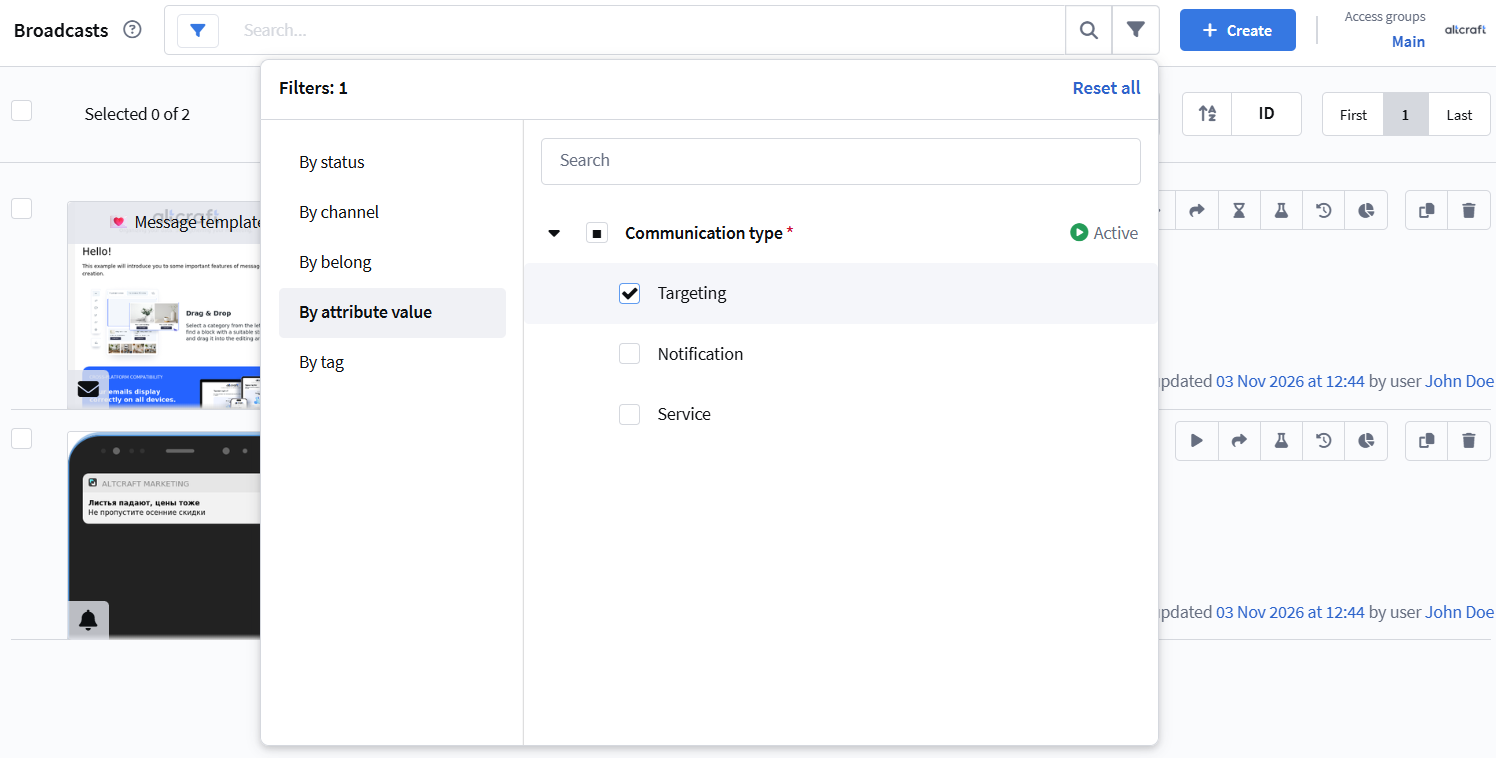
Filtering the mailing list by attribute value

Completeness and format validation​

Problem. Each entity must carry certain data — for example, an owner and a ticket number — and values with an incorrect format must not enter the system.

Solution. A required attribute Owner with the values Ivanov, Petrova, Sidorova: the entity cannot be saved without a selected value. Configure the Ticket number attribute with the Limit character count and Use a regular expression options to check the length and format of the entry.

How format checks work:

  • A regular expression validates the entered attribute value against a pattern. The pattern describes the allowed entry format — for example, /[A-Z]{2}-\d{4}/ requires a value like AB-1234. An entity cannot accept a value that does not match the pattern: when saving a campaign, mailing, or scenario with such a value, the platform rejects the save.

  • The character count limit sets the maximum length of the value. It is useful when the attribute value is passed to an external system with a strict field length limit (for example, a contract number of up to 20 characters), or when the value is output in a template and must not bloat the content. A value that exceeds the limit is not accepted.

tip

Both checks apply to the values entered by the user. If a value is selected from a predefined list, it already conforms to the specified format, so the regular expression and the length limit are especially useful when the user is allowed to add new values while editing an entity.

The Disable attribute editing in active entities option blocks changing values after activation, and the default value is inserted automatically if the user has not selected their own.

caution

Attributes control data completeness and format but do not govern launching: permission to launch an entity is configured with roles and access groups, not with attributes.
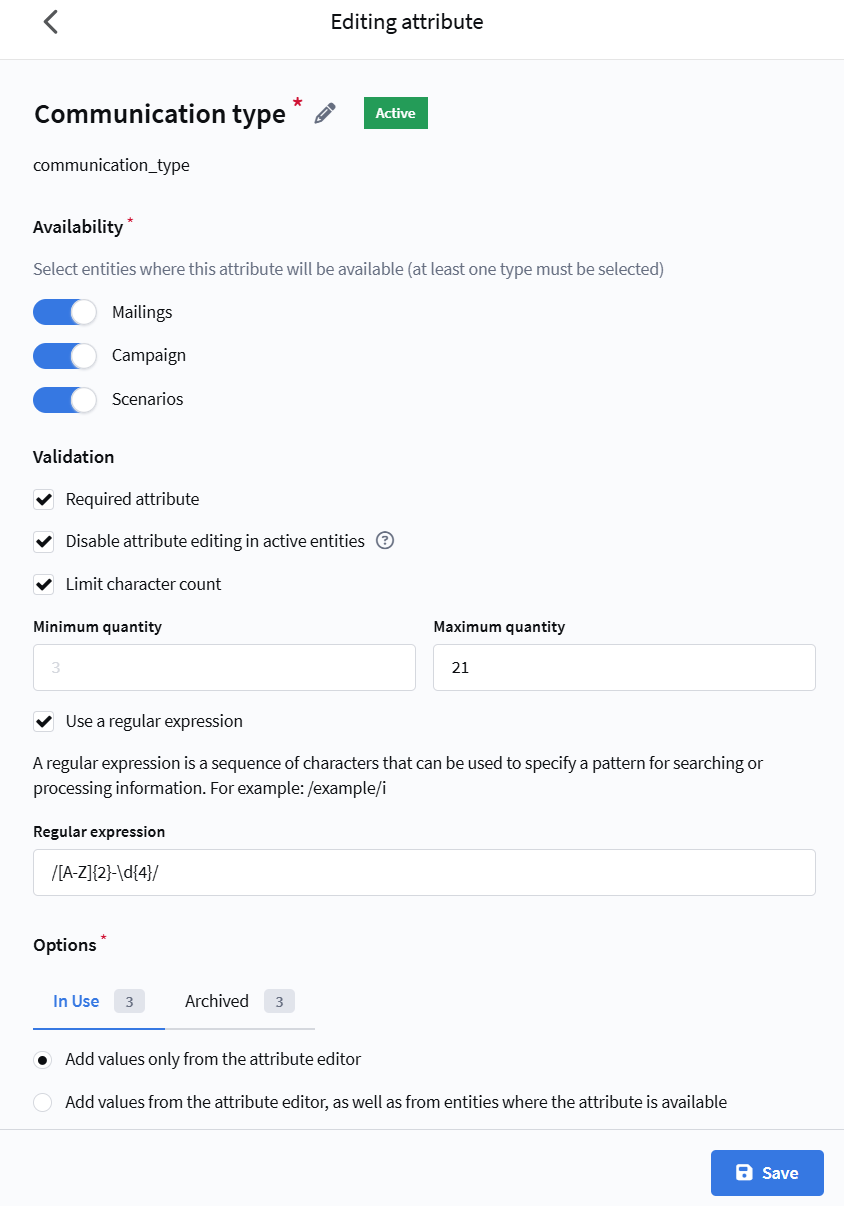
Creating an attribute with required flag, character limit, and regular expression

Audience selection​

Tagging entities with attributes serves as a basis for profile selection.

Segmentation. In segmentation by activity, profiles are selected by participation in mailings with a specific attribute value. For example, the segment "received a targeted mailing" is built by the attribute Communication type = Targeting — without manually listing mailings in the condition. Such a segment automatically includes new mailings with this attribute and helps control communication frequency: for example, select subscribers who received several service messages in a row, or avoid sending targeted messages to those who recently received promotional ones.

Control groups. In global control group settings, entities with a specific attribute value are excluded — for example, service mailings do not participate in the effectiveness calculation. In the local control group (LCG) settings, a filter by attribute values builds rules for excluding profiles by the attributes of specific campaigns, scenarios, and mailings.
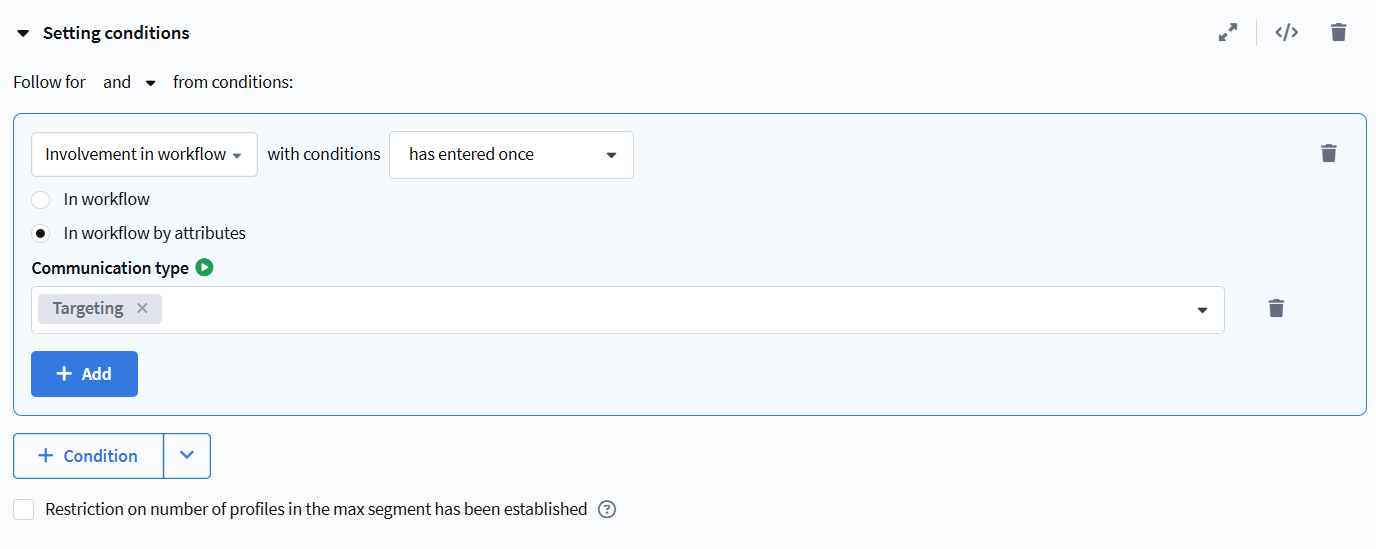
Segmentation condition selecting profiles by attribute value

Content personalization​

Problem. Insert into a template or link a value that a marketer sets once at the entity level and that changes from launch to launch — for example, a landing page link with UTM tags. The template remains a single one: no need to edit the layout or copy it for each campaign.

Solution. Create an attribute, for example Promo link, and specify its API name — it is used in variables. The value is set on the entity when it is created or modified: manually by a marketer or via the API. For mailings, the value does not have to be duplicated — it is inherited from the campaign or scenario.

Insert the variable into the button link of the template:

https://example.com/promo?utm_source=news&utm_campaign={attribute_value("promo_url")}

When sending, the platform substitutes the attribute value set on the entity (or inherited) into it. For example, a single promo template with the "More about the offer" button is used for all launches, while the landing page address with UTM tags changes from campaign to campaign: a link with the spring_2026 tag is set in a campaign — the button leads to it; the next launch gets a different tag, with no template editing.

The "Attribute value" variable is inserted into content and into the URL. The attribute value can be selected in Viber, WhatsApp, Notify, and MAX templates. For more about the variable, see the Attribute settings article.

info

An attribute stores one value per entity — it is the same for all recipients of a mailing. This mechanism suits content shared across the whole campaign (links, UTM tags, promo identifiers) and is not suitable for personal data: a unique promo code, a subscriber name, or their balance is substituted from profile fields, Market data, or a loyalty program.

Integration with external systems​

Problem. An external system (CRM, BI) passes entity tagging to the platform and receives attribute values back — for reporting or automation.

Solution. For each attribute, fill in the API name — the attribute is identified by it in requests. Parameters with the attribute name and value are available in platform API requests, and entity list requests return attribute values in the response. For more about the API, see the corresponding section.

For example, to get the list of mailings with a specific attribute value, send a POST request to https://example.com/api/v1.1/campaigns/list:

{
"attributes": {
"communication_type": {
"options": ["Targeting"]
}
}
}

The platform will return the mailings whose communication_type attribute equals Targeting:

{
"data": [
{
"id": 130,
"name": "Autumn Sales",
"type": "broadcast",
"is_active": false,
"attributes": {
"communication_type": "Targeting"
}
},
{
"id": 131,
"name": "20% Off Annual Subscription",
"type": "broadcast",
"is_active": false,
"attributes": {
"communication_type": "Targeting"
}
}
],
"error": 0,
"error_text": "Successful operation",
"total_count": 2
}

The full description of the request and response parameters is in the developer documentation.

In custom channel pipelines, the entity attribute value is available via the $getAttributeValue(message_id, "attribute_id") function — for example, to pass a parameter set at the campaign or mailing level to an external API.

Attributes can also be updated for already completed mailings — tagging does not "freeze" after a mailing ends and remains available for refinement.

Last updated on Nov 6, 2026
Previous
Account settings
Next
Custom links
  • Entity tagging and search
  • Completeness and format validation
  • Audience selection
  • Content personalization
  • Integration with external systems
© 2015 - 2026 Altcraft, LLC. All rights reserved.